
Affordable Government Cyber Access Control =
True MFA + Enterprise Password Manager + Your Existing PIV or CAC card
Employee-managed passwords are cybersecurity’s weakest link, and Power LogOn closes that gap. Power LogOn is an IT-managed, centralized enterprise password manager that logs users into Windows with true MFA: card + PIN, card + biometric, or card + PIN + biometric, using the agency’s PIV or CAC card.
On networked workstations, Power LogOn for Government uses the PIV or CAC credential with a Power LogOn PIN. For air-gapped workstations, Power LogOn GOV-COA brings logon with the PIV or CAC credential’s existing digital certificate.
Power LogOn works with the agency’s existing CAC, PIV, PIV-I, CIV and TWIC credentials to eliminate reprogramming and reissuance. Power LogOn makes no changes to the card’s data, so the agency’s cards don’t have to be reissued or revalidated. That saves the agency time and money, and deployment is immediate.
Typical installation takes less than two hours.
For pricing and an evaluation kit, contact Access Smart.
Cybersecurity starts when you first turn on the computer… before the firewall!
If you’re only implementing security behind the firewall, you’re too late! True MFA must start before the computer operating system is fully booted. Otherwise, the hacker is already through your virtual front door. Power LogOn is an IT-managed, centralized enterprise password manager.
True MFA for Windows logon: a PIV or CAC Smartcard (something you have) plus a Power LogOn PIN (something you know). Power LogOn also supports card + biometric (something you have plus something you are) and card + PIN + biometric (all three factors).
After the cardholder logs on with true MFA, the IT Administrator centrally controls and manages the operating system logon passwords and all other logon passwords. The user never directly authenticates into the computer or network – Power LogOn does it for them.
If an agency already has an established sign-on procedure using its PIV or CAC credential, Power LogOn works with that. The agency’s IT department controls how Power LogOn secures its network.
It’s not a password problem. It’s a password management problem!
Password authentication (when properly executed) is secure. The way employees are allowed to (or forced to) manage passwords is not. When employees are allowed to generate, remember, type, manage or even know their own passwords, then IT has effectively relinquished network security to the weakest link: their fellow employees!
Power LogOn for Government addresses specific agency needs:
- Power LogOn only uses the Microsoft cryptographic services provided by the Windows operating system.
- Power LogOn works with the agency’s existing CAC, PIV, PIV-I, CIV and TWIC credentials to eliminate reprogramming and reissuance.
- Power LogOn makes no changes to the card’s data, so the agency’s cards don’t have to be reissued or revalidated. That saves the agency time and money, and deployment is immediate.
- Secure and Protect Sensitive Data, Applications and Networks
- Lower Help Desk Costs
- Implement true MFA on Windows-based Computers, Applications and Networks
- Lower Cost of Ownership
- Allow Scalability
- Lower Time and Cost to Implement
- Provide Ease of Use for End Users
- Customize for Specific Environments
Power LogOn is a COTS product, so it doesn’t need a separate review under each government security specification.
Questions about Power LogOn and your agency’s security standards? Contact Access Smart.
Passwords are not going away anytime soon!
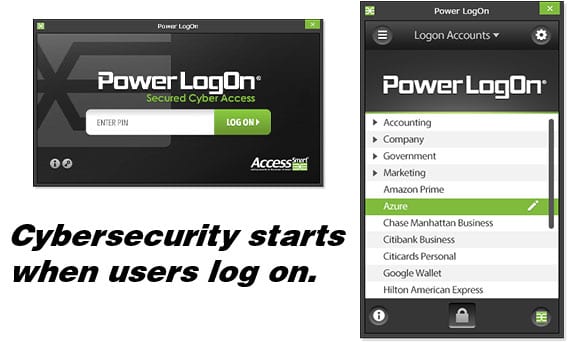
For details, see Power LogOn for Government and Power LogOn GOV-COA.
Even if employees already log in to your network with a digital certificate, at some point they are going to access a server, cloud, website or application that also requires a user name and password. How do they log in to those? What if the IT Administrator centrally controlled and managed all those passwords, too? With Power LogOn, the IT Administrator can secure all the agency’s virtual front doors. Users never know the managed passwords, so they can’t be tricked into giving them away. And password reset help desk calls are greatly reduced because there’s nothing for them to know.
Users never type or see the managed passwords. After true MFA user verification, Power LogOn auto-fills in usernames and passwords. Before it fills in a logon, Power LogOn checks the application path and website address. Users never see the managed passwords unless IT allows it.
Implement long, unique, complex passwords that can change frequently, without user involvement.
The user only needs to double-click the site, application or network account they want to access. Power LogOn automatically launches the account and auto-fills the logon information.
IT sets password length, complexity, character types, the minimum number of each character type and how often passwords change, all without user involvement.
Stored passwords are protected with AES-256 encryption plus SHA-256 hashing, with hash salting, and kept on the agency’s own servers. Nothing in Power LogOn runs on Access Smart servers.
Keep the cost of ownership low.
One of the biggest barriers agencies face in implementing true MFA is the cost of ownership, and Power LogOn addresses that gap: Power LogOn works with the agency’s existing CAC, PIV, PIV-I, CIV and TWIC credentials to eliminate reprogramming and reissuance.
Power LogOn doesn’t require proprietary hardware. You can use what you already have or buy from a third party, if necessary.
For pricing and an evaluation kit, contact Access Smart.
Access Smart, LLC | UEI: X4CCM6HULMX6 | CAGE: 5AU22 | 4049 Northwood Pl, The Villages, FL 32163-2293 | 949-218-8754 | Contact Access Smart